intermediateMicrocontrollers9-Sept-2026
Turning a Tion 3S Breezer into a CO2-Controlled Smart Supply Ventilator with ESPHome

Anton Shagaev
Tashkent, UZ
3 hours
35
37
Hello friends! A breezer like the Tion 3S is a wall-mounted forced-air supply ventilator. Its main job is to pull fresh outdoor air into the room, filter out dust, allergens, and odors using a thick filter stack, and warm it up to a comfortable temperature with a built-in ceramic heater. It solves the classic problem of tightly sealed modern apartments: you either keep the windows closed and deal with stuffy air, morning headaches, and high CO2 levels, or you open the windows and let in freezing drafts, street noise, and pollution. It is a solid piece of hardware for indoor air quality, but out of the box, its smart capabilities are severely lacking.
You can technically get automatic CO2 control by purchasing Tion's official MagicAir base station, but that costs roughly $270 to $360 depending on the model. Compared to a custom Zigbee CO2 sensor like the DIYRuZ_AirSense (built on a Texas Instruments chip and exposing a clean MQTT entity) which sets you back around $69 if bought ready-made, or just $25-$35 for the components if you build it yourself - the official route is unreasonably expensive. More importantly, since the primary control system in my house is already Home Assistant, I explicitly wanted the breezer integrated natively into HA, rather than running a parallel, closed-off ecosystem just for ventilation.
The Tion 3S was never designed to talk to Home Assistant at all. The only reason it works with HA today is that a small group of enthusiasts reverse-engineered the breezer's Bluetooth LE protocol and built a custom integration on top of it, 'TionAPI/HA-tion'. It is a solid work and it does let you flip fan speeds and heater modes from HA, but it inherits every limitation of BLE: it's slow to respond, the connection drops constantly, and - since our HA server sits in a different room from the breezer - the server's Bluetooth radio sometimes simply can't reach it through the walls at all. Every automation built on top of that link inherited the same flakiness.
Swapping the BLE link for a NodeMCU ESP8266 talking straight to the breezer's UART header fixes all three problems at once: it's on Wi-Fi instead of relying on BLE range, commands land in well under a second instead of several seconds, and the connection to Home Assistant simply doesn't drop. That reliability is what actually makes the rest of this project possible - once the breezer responds instantly and consistently, you can wire it up to a real CO2 sensor and Home Assistant automations and turn a dumb, on/off supply ventilator into something that actually reacts to air quality in the room by pulling in and pre-heating fresh outdoor air on its own.
What you'll need
Materials
- 1 pc
- 1 pc
- 4 pcs
- 1 pc
Steps
1
Opening up the breezer
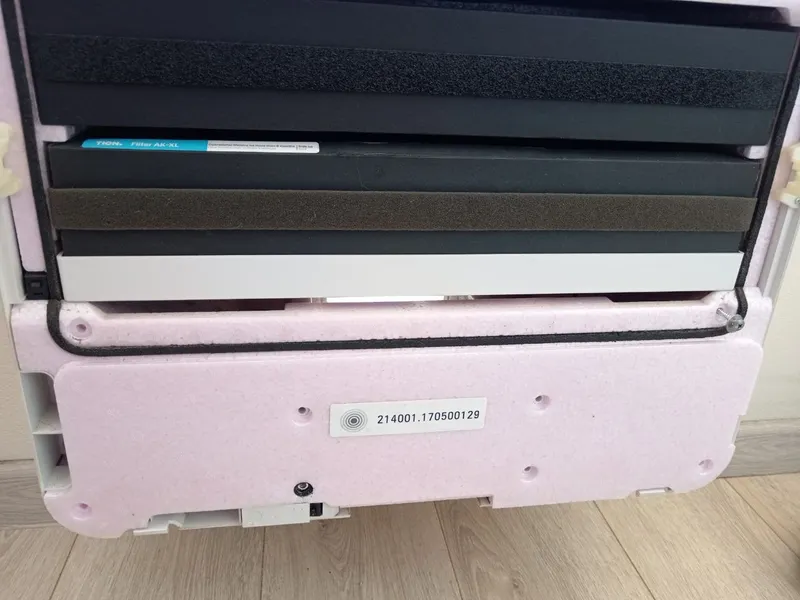
Unscrewing the bottom cover to access the control board
Once the power is completely disconnected, pop the front cover off. You don't actually need to pull out the filter stack to reach the electronics. Instead, unscrew the screws from the bottom cover as shown below. The control board is located right under this cover on the right side.
Unplug the breezer from the 220V wall outlet before doing anything else.
2
First view of the control board
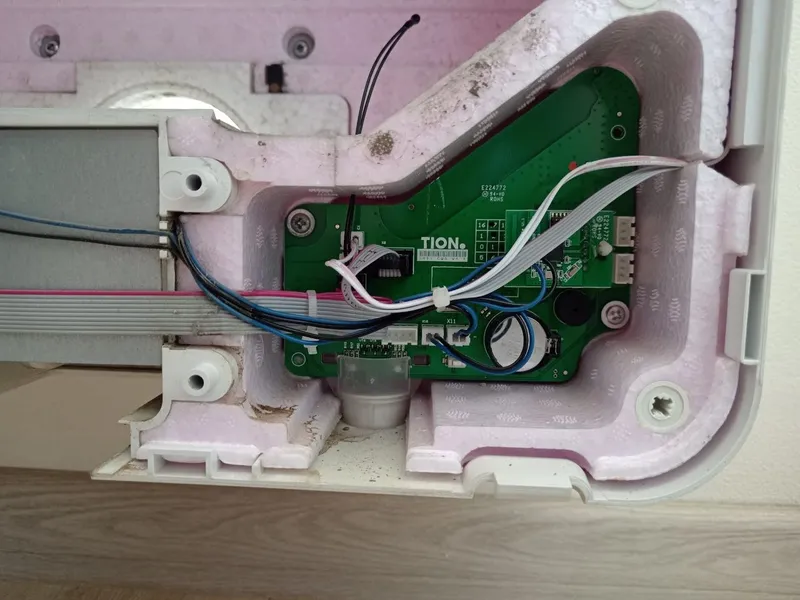
First view of the control board with the stock BLE module connected
Once you remove the bottom cover, you get your first view of the electronics bay. Down in the corner sits the main control board - the one with the buzzer, the coin-cell backup battery, and the ribbon cable. Here you can see the stock BLE module still clipped onto the UART header.
3
Removing the stock BLE module
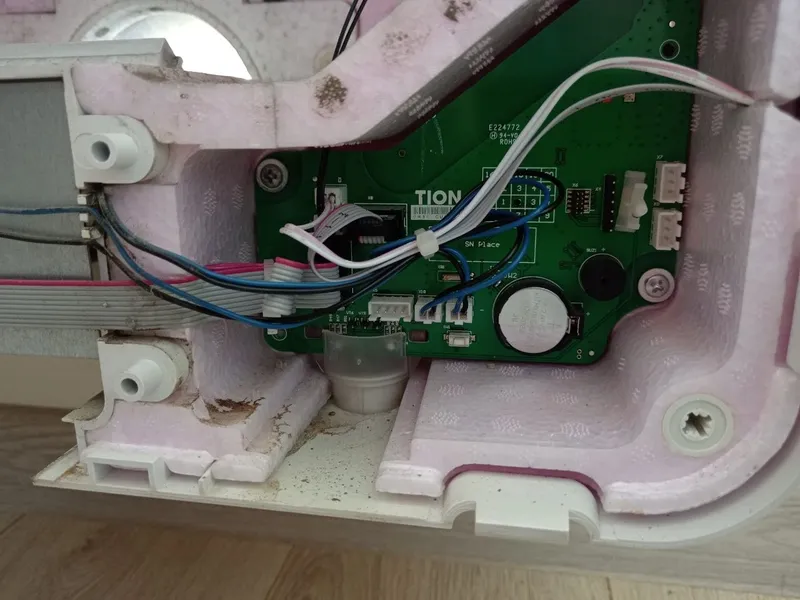
The stock BLE module removed from the breezer
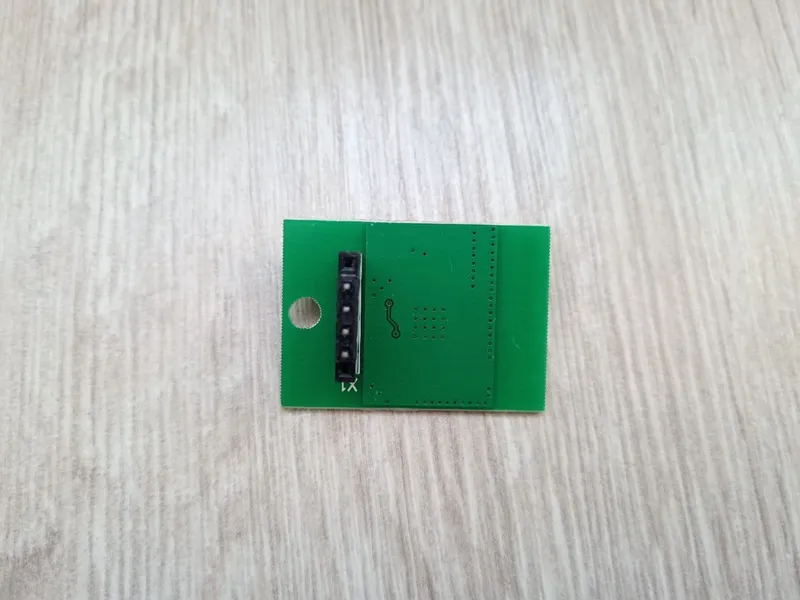
BLE module
This BLE module is exactly the part we are bypassing. Carefully pull it off the pins to remove it from the breezer. Here is how the main control board looks with the stock module removed, clearly exposing the UART pins.
4
Wiring the NodeMCU to the Tion 3S
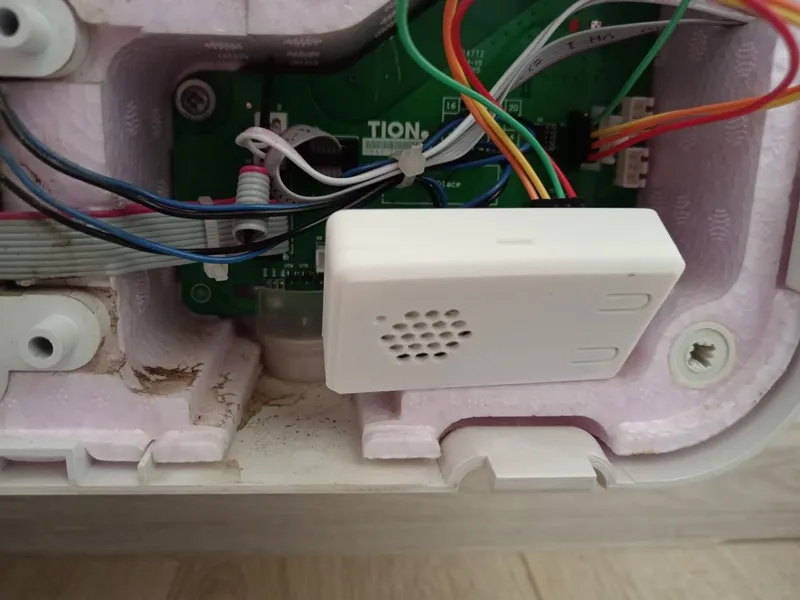
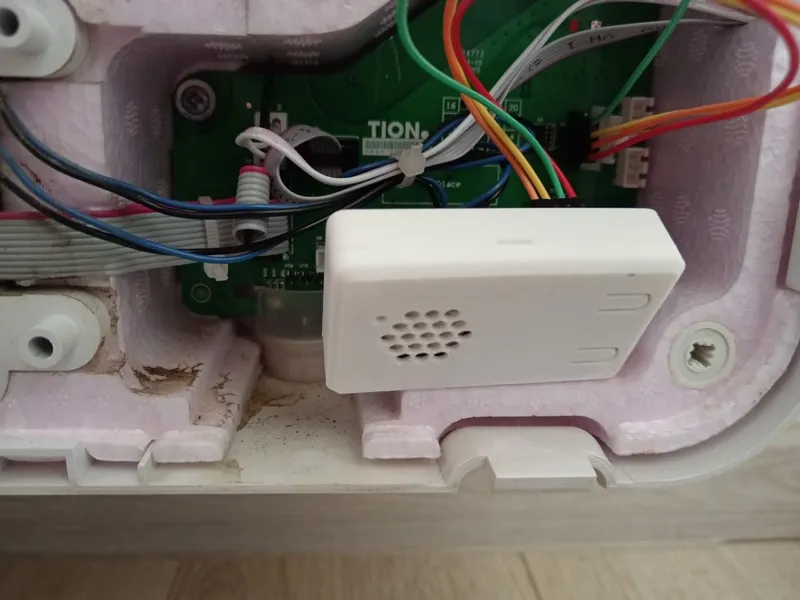
NodeMCU in the 3D-printed case connected to the UART pins
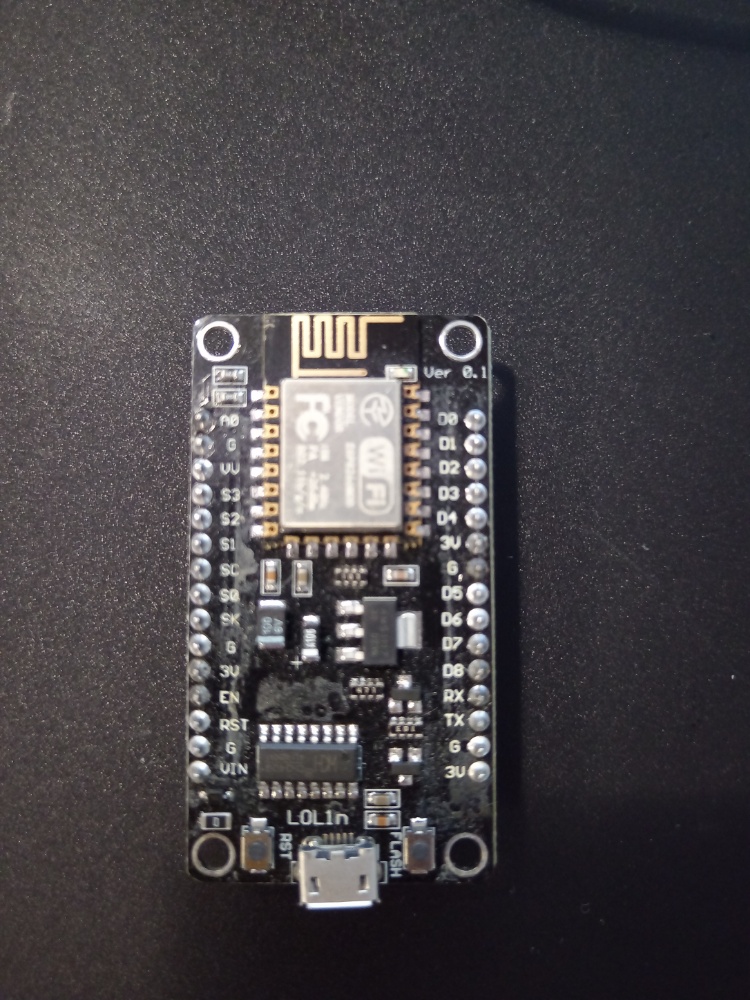
ESP8266 top side
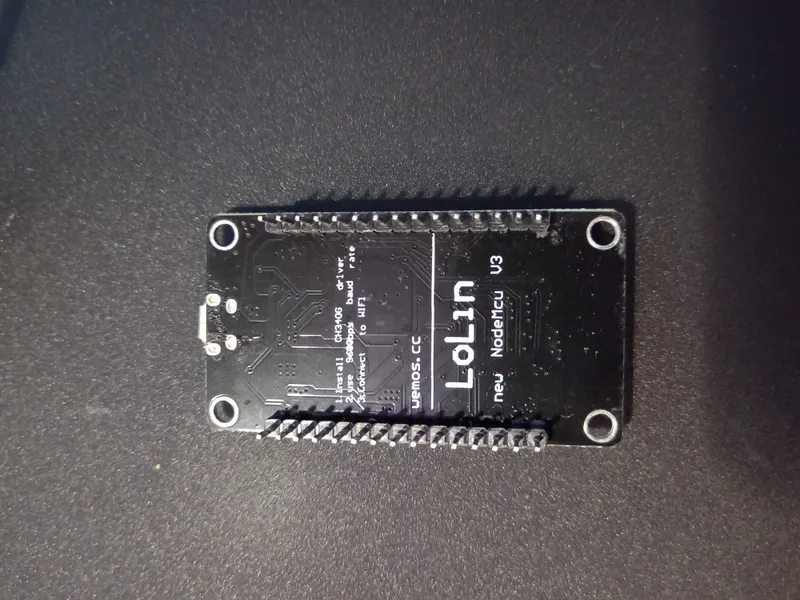
ESP8266 bottom side
I printed a small enclosure for the NodeMCU (the iBoxit case from MakerWorld) to keep the board clean and protected. Wire the 4-wire UART header inside the unit (TX, RX, GND, 3.3V) straight to the NodeMCU's hardware UART pins (TX/RX), GND, and 3.3V for power. No level shifting needed - both sides run at 3.3V logic, and the breezer can power the NodeMCU directly. Here is the NodeMCU in its printed box already connected to the breezer's UART pins.
5
Flashing the Firmware (ESPHome)
Before Home Assistant can see the device, we need to compile and flash the NodeMCU via a USB cable. For this step, you will need a Home Assistant instance with the ESPHome integration enabled, the ESPHome CLI (I ran it via Docker using 'ghcr.io/esphome/esphome:2024.12.0'), and the 'dentra/esphome-tion' external component. All the firmware compilation and flashing steps were done on a computer running Linux machine directly through the terminal.
Note: You only need to plug the NodeMCU into your computer via USB for this very first flash. Once the firmware is on the board and it connects to your Wi-Fi, you can install it in the breezer. All future firmware updates and config tweaks can be done over-the-air (OTA) via Wi-Fi by simply pointing the ESPHome CLI to the NodeMCU's IP address.
1. Preparing the working directory
First, create a dedicated folder for the project and navigate into it:
tinkster@almalinux:~#
1mkdir -p ~/tion-esphome && cd ~/tion-esphome
2. Creating the secrets.yaml file
Inside the tion-esphome directory, create a file named secrets.yaml to hold your Wi-Fi credentials. ESPHome will pull from this file during the build.
secrets.yaml
1wifi_ssid: "YOUR_WIFI_NAME"2wifi_password: "YOUR_WIFI_PASSWORD"
3. Creating the main configuration file
In the same directory, create the tion-uart.yaml file. I based the whole firmware on the packages/tion_3s.yaml bundle from dentra/esphome-tion, which already ships the UART protocol implementation. I also baked the CO2 automation logic directly into the ESPHome node using an interval block that reads a Home Assistant sensor.
Here is the final, fully working tion-uart.yaml end to end:
tion-uart.yaml
1substitutions:2node_name: tion-3s3friendly_name: Tion 3S4name: tion-3s5tion_conn: uart6board_code: nodemcuv27board: nodemcuv28tion_type: 3s9tx_pin: TX10rx_pin: RX11wifi_ssid: !secret wifi_ssid12wifi_password: !secret wifi_password13wifi_ap_password: tion-32489-3s1415packages:16tion:17url: https://github.com/dentra/esphome-tion18ref: 2024.12.019files:20- packages/wifi_signal.yaml21- packages/uptime.yaml22- packages/restart.yaml23- packages/tion_energy.yaml24- packages/tion_enable_antifreeze.yaml25- packages/base.yaml26- packages/esp8266_uart.yaml27- packages/tion_3s.yaml2829api:3031wifi:32ssid: $wifi_ssid33password: $wifi_password34ap:35password: $wifi_ap_password3637vport:38- platform: tion_3s_uart39id: tion_uart_vport40uart_id: tion_uart4142tion:43type: 3s44id: tion_api45vport_id: tion_uart_vport46update_interval: 30s47batch_timeout: 200ms48state_timeout: 3s49force_update: false50presets:51home: { fan_speed: 2, temperature: 20, heater: False }52sleep: { fan_speed: 1, temperature: 18, heater: False }53away: { fan_speed: 1, temperature: 10, heater: False }5455climate:56- platform: tion57id: tion_climate58name: None59enable_heat_cool: false60enable_fan_auto: true6162fan:63- platform: tion64id: tion_fan65name: Fan66on_state:67- lambda: |-68if (id(correcting_fan_speed)) {69id(correcting_fan_speed) = false;70id(fan_was_on) = id(tion_fan)->state;71if (id(tion_fan)->state) {72id(last_fan_speed) = id(tion_fan)->speed;73}74return;75}76bool is_on = id(tion_fan)->state;77int spd = id(tion_fan)->speed;78bool just_turned_on = is_on && !id(fan_was_on);79if (just_turned_on && !id(co2_auto_writing) && spd == 6 && id(last_fan_speed) != 6) {80id(correcting_fan_speed) = true;81auto call = id(tion_fan)->turn_on();82call.set_speed(id(last_fan_speed));83call.perform();84} else if (is_on && !id(co2_auto_writing)) {85id(last_fan_speed) = spd;86}87id(fan_was_on) = is_on;8889sensor:90- platform: homeassistant91id: playroom_co292entity_id: sensor.0x00158d0008f3a21b_co293internal: true94- platform: template95id: tion_current_temperature_sensor96name: Current Temperature97unit_of_measurement: "°C"98device_class: temperature99state_class: measurement100update_interval: 30s101lambda: |-102return id(tion_climate).current_temperature;103- platform: template104id: tion_target_temperature_sensor105name: Target Temperature106unit_of_measurement: "°C"107device_class: temperature108state_class: measurement109update_interval: 30s110lambda: |-111return id(tion_climate).target_temperature;112- platform: tion113id: tion_outdoor_temperature114type: outdoor_temperature115name: Outdoor Temperature116- platform: tion117id: tion_heater_power118type: heater_power119name: Heater Power120- platform: tion121id: tion_productivity122type: productivity123name: Productivity124- platform: tion125id: tion_filter_time_left_days126type: filter_time_left_days127name: Filter Time Left128- platform: tion129id: tion_boost_time_left130type: boost_time_left131name: Boost Time Left132- platform: tion133id: tion_fan_speed134type: fan_speed135name: Fan Speed136137switch:138- platform: tion139id: tion_buzzer140type: sound141name: Buzzer142- platform: tion143id: tion_boost144type: boost145name: Boost146- platform: template147id: auto_co2_switch148name: "Auto Mode (CO2)"149icon: mdi:fan-auto150optimistic: true151lambda: |-152return id(auto_co2_enabled);153turn_on_action:154- lambda: 'id(auto_co2_enabled) = true;'155turn_off_action:156- lambda: 'id(auto_co2_enabled) = false;'157158number:159- platform: tion160id: tion_boost_time161type: boost_time162name: Boost Time163initial_value: 20min164restore_value: true165- platform: tion166id: tion_auto_min_fan_speed167type: auto_min_fan_speed168name: Auto Min Fan Speed169initial_value: 1170restore_value: true171- platform: tion172id: tion_auto_max_fan_speed173type: auto_max_fan_speed174name: Auto Max Fan Speed175initial_value: 6176restore_value: true177178select:179- platform: tion180id: tion_air_intake181type: air_intake182name: Air Intake183184binary_sensor:185- platform: tion186id: tion_state_problem187type: state188name: State Problem189- platform: tion190id: tion_filter_worn_out191type: filter192name: Filter Worn Out193- platform: tion194id: tion_heater_state195type: heater196name: Heater State197- platform: tion198id: tion_power_state199type: power200name: Power State201202text_sensor:203- platform: tion204id: tion_firmware_version205type: firmware_version206name: Version207- platform: tion208id: tion_errors209type: errors210name: Errors211212button:213- platform: tion214id: tion_reset_filter215type: reset_filter216name: Reset Filter217confirm:218name: Reset Filter Confirm219220globals:221- id: auto_co2_enabled222type: bool223restore_value: true224initial_value: 'true'225- id: last_fan_speed226type: int227restore_value: true228initial_value: '2'229- id: fan_was_on230type: bool231restore_value: false232initial_value: 'false'233- id: co2_auto_writing234type: bool235restore_value: false236initial_value: 'false'237- id: correcting_fan_speed238type: bool239restore_value: false240initial_value: 'false'241242interval:243- interval: 60s244then:245- if:246condition:247- binary_sensor.is_on: tion_power_state248- lambda: 'return id(tion_air_intake).state != "outdoor";'249then:250- select.set:251id: tion_air_intake252option: "outdoor"253- interval: 30s254then:255- lambda: |-256if (!id(auto_co2_enabled)) return;257if (!id(tion_power_state).state) return;258float co2 = id(playroom_co2).state;259int speed;260if (co2 > 1600) speed = 6;261else if (co2 > 1400) speed = 5;262else if (co2 > 1200) speed = 4;263else if (co2 > 1000) speed = 3;264else if (co2 > 800) speed = 2;265else speed = 1;266id(co2_auto_writing) = true;267auto call = id(tion_fan).turn_on();268call.set_speed(speed);269call.perform();270id(co2_auto_writing) = false;
With the NodeMCU connected via USB and the tion-esphome folder containing both the secrets.yaml and tion-uart.yaml files, you can run the ESPHome Docker container from within that same folder to compile and flash the firmware:
tinkster@almalinux:~#
1docker run --rm -it --device=/dev/ttyUSB0 -v "$PWD":/config ghcr.io/esphome/esphome:2024.12.0 run tion-uart.yaml
Once the initial firmware is flashed via USB and the NodeMCU is installed inside the breezer and connected to your Wi-Fi network, you no longer need physical USB access. To update or tweak the configuration later, simply pass the device's IP address using the --device flag in your terminal:
tinkster@almalinux:~#
1docker run --rm -it --network host -v "$PWD":/config ghcr.io/esphome/esphome:2024.12.0 run tion-uart.yaml --device 192.168.0.121
6
Home Assistant Setup
Once the board is flashed and connected to Wi-Fi, Home Assistant will automatically discover it via ESPHome.
To cleanly expose the controls, I built a vertical stack card for the dashboard. It dynamically hides the manual fan dropdown when our new "Auto Mode" switch is flipped on (preventing manual overrides while CO2 logic is running) and dims out the air intake selector using card-mod. It strictly focuses on the breezer itself and the CO2 sensor guiding it.
tinkster@almalinux:~#
1type: vertical-stack2cards:3- type: conditional4conditions:5- entity: switch.tion_3s_auto_mode_co26state: "off"7card:8type: thermostat9entity: climate.tion_3s10features:11- type: climate-fan-modes12style: dropdown13- type: climate-hvac-modes14name: Supply ventilation15- type: conditional16conditions:17- entity: switch.tion_3s_auto_mode_co218state: "on"19card:20type: thermostat21entity: climate.tion_3s22features:23- type: climate-hvac-modes24name: Supply ventilation25- type: entities26entities:27- entity: switch.tion_3s_auto_mode_co228secondary_info: last-changed29name: Auto mode30- entity: select.tion_3s_air_intake31name: Air intake32card_mod:33style: |34:host {35pointer-events: {{ 'none' if is_state('switch.tion_3s_auto_mode_co2', 'on') else 'auto' }};36opacity: {{ '0.4' if is_state('switch.tion_3s_auto_mode_co2', 'on') else '1' }};37}38- entity: sensor.0x00158d0008f3a21b_co239name: CO2 level40secondary_info: last-changed41- entity: sensor.tion_3s_fan_speed42name: Current speed43secondary_info: last-changed44- entity: sensor.tion_3s_outdoor_temperature45secondary_info: last-changed46name: Intake temperature47- entity: sensor.tion_3s_current_temperature48secondary_info: last-changed49name: Outlet temperature50state_color: true
tinkster@almalinux:~#
1- alias: Turn off ventilation when any loggia window opens2triggers:3- trigger: device4type: opened5device_id: 112233445566778899aabbccddeeff006entity_id: aabbccddeeff001122334455667788997domain: binary_sensor8- trigger: device9type: opened10device_id: 99887766554433221100ffeeddccbbaa11entity_id: ffeeddccbbaa9988776655443322110012domain: binary_sensor13conditions: []14actions:15- action: fan.turn_off16target:17entity_id: fan.tion_3s_fan1819- alias: Turn on ventilation once both loggia windows are closed20triggers:21- trigger: device22type: not_opened23device_id: 112233445566778899aabbccddeeff0024entity_id: aabbccddeeff0011223344556677889925domain: binary_sensor26- trigger: device27type: not_opened28device_id: 99887766554433221100ffeeddccbbaa29entity_id: ffeeddccbbaa9988776655443322110030domain: binary_sensor31conditions:32- condition: device33type: is_not_open34device_id: 112233445566778899aabbccddeeff0035entity_id: aabbccddeeff0011223344556677889936domain: binary_sensor37- condition: device38type: is_not_open39device_id: 99887766554433221100ffeeddccbbaa40entity_id: ffeeddccbbaa9988776655443322110041domain: binary_sensor42- condition: state43entity_id: fan.tion_3s_fan44state: 'off'45actions:46- action: fan.turn_on47target:48entity_id: fan.tion_3s_fan49- delay:50seconds: 1551- action: select.select_option52target:53entity_id: select.tion_3s_air_intake54data:55option: "outdoor"
Conclusion
Eliminating the BLE connection was the core goal of this project. Since the Tion 3S wasn't designed as a smart-home appliance, poor Bluetooth range and reliability made early community integrations almost unusable. Upgrading to a NodeMCU over UART and Wi-Fi transforms the breezer into a smart device.
The dentra/esphome-tion component gets you 95% of the way there for a Tion 3S with zero fuss. However, getting to the perfectly stable firmware required patching several issues along the way.
Bug #1: Build fails because of a broken ETL library reference
The very first compile choked trying to resolve a PlatformIO library dependency called etlcpp/Embedded Template Library at version 20.35.8. Since the external component's own generated etl module is what issues that call, I patched it directly to point at the GitHub source and pinned it to a specific commit hash:
tinkster@almalinux:~#
1sudo chown -R "$USER":"$USER" .esphome23ETL_PY="$(find .esphome -path '*/components/etl/__init__.py' -print -quit)"45cp "$ETL_PY" "${ETL_PY}.bak"67sed -i '/cg.add_library("etlcpp\/Embedded Template Library", "20.35.8")/c\8cg.add_library(\9name="Embedded Template Library",\10repository="https://github.com/ETLCPP/etl.git#20.35.8",\11version=None,\12)' "$ETL_PY"1314sudo sed -i 's|cg.add_library("etlcpp/Embedded Template Library", "20.35.8")|cg.add_library("https://github.com/ETLCPP/etl.git#e74f8b46", None)|' \15.esphome/external_components/d18ce5a7/components/etl/__init__.py
Bug #2: The UART flood ("prev frame was not recv, may lead to crash")
This was the absolute main and most critical bug of the entire project. Because a rogue second polling loop inside the tion_3s_uart vport was firing request_command4() independently on its own timer, overlapping frames flooded the bus. This completely broke normal device operation and risked crashing or locking up the breezer's MCU.
The console filled up with warnings on almost every single request cycle. Grepping for the actual request call across every external component pointed me at the real source: the tion_3s_uart vport has its own update() override that fires request_command4() on its own internal timer, completely independent of the main tion component's own polling loop.
tinkster@almalinux:~#
1sudo chown -R "$USER":"$USER" .esphome23ETL_PY="$(find .esphome -path '*/components/etl/__init__.py' -print -quit)"45cp "$ETL_PY" "${ETL_PY}.bak"67sed -i '/cg.add_library("etlcpp\/Embedded Template Library", "20.35.8")/c\8cg.add_library(\9name="Embedded Template Library",\10repository="https://github.com/ETLCPP/etl.git#20.35.8",\11version=None,\12)' "$ETL_PY"1314sudo sed -i 's|cg.add_library("etlcpp/Embedded Template Library", "20.35.8")|cg.add_library("https://github.com/ETLCPP/etl.git#e74f8b46", None)|' \15.esphome/external_components/d18ce5a7/components/etl/__init__.py1617sed -i '/super_t::write(\*frame, datav.size());/i\ this->await_frame_ = true;' \18.esphome/external_components/9d181271/components/tion/tion_vport_uart.h1920cp .esphome/external_components/9d181271/components/tion_3s_uart/tion_3s_uart_vport.h \21.esphome/external_components/9d181271/components/tion_3s_uart/tion_3s_uart_vport.h.orig2223sed -i 's|void update() override { this->api_->request_command4(); }|void update() override {}|' \24.esphome/external_components/9d181271/components/tion_3s_uart/tion_3s_uart_vport.h
The fix was to stop that second, redundant polling loop entirely and let the main tion component be the only thing driving communication.
Bug #3: The native "Auto Mode" switch won't stay on
I flipped the native Auto Mode switch on, and it silently flipped itself back off.
tinkster@almalinux:~#
1[D][switch:012]: 'Auto Mode' Turning ON.2[D][tion-api:181]: New auto state OFF -> ON3[D][switch:012]: 'Auto Mode' Turning ON.4[D][tion-api:181]: New auto state OFF -> ON
Every single 5-second check found the flag already back to OFF. Without a physical MagicAir module talking to the breezer, the firmware treats the auto mode as unsupported and keeps resetting it. The fix (included in the final configuration above) was to bypass the hardware flag entirely, creating a purely software switch backed by a global variable, and an interval that reads a CO2 sensor piped in from Home Assistant to set the fan speed directly.
Bug #3: The intake damper drifts and the fan "always jumps to max speed"
The select for intake mode occasionally drifted away from outdoor on its own. A simple 60-second interval was added to re-assert it to outdoor. Additionally, toggling the fan on/off from a plain Home Assistant tumble switch made ESPHome call turn_on() with no explicit speed, defaulting to 6/6. This was patched with a small state machine in the on_state lambda to remember the last manually set speed and correct it back if a bare turn_on() lands on max speed incorrectly.
Update 10-Sep-2026: Multi-Sensor Air Quality Control & Accelerated Reporting
I have updated the firmware logic to factor in more than just CO2. Since the main objective is overall indoor air quality, I added an IKEA VINDSTYRKA to the mix via Zigbee2MQTT. It exposes reliable VOC index and PM2.5 measurements alongside the standard metrics.
To ensure the breezer reacts instantly to air quality drops, I also accelerated the reporting intervals for both the DIYRuZ_AirSense (CO2) and the IKEA VINDSTYRKA (VOC, PM2.5) sensors. By default, these sensors can be quite lazy, sometimes waiting up to an hour to report data if the changes are gradual. Through the Zigbee2MQTT "Reporting" tab for each cluster, I enforced much more aggressive polling parameters:
Min rep interval: 5 (seconds)
Max rep interval: 60 (seconds)
Min rep change: 10 (for CO2 to prevent micro-fluctuation noise) and 1 (for PM2.5 and VOC).
This setup forces the sensors to report data to Home Assistant at least once a minute, or within 5 seconds if a noticeable change occurs. This makes the ESPHome automations incredibly responsive, allowing the breezer to spool up the fan the moment the air quality begins to degrade.
The ESPHome node now pulls all three parameters from Home Assistant (CO2, VOC, and PM2.5). The custom polling loop evaluates the required fan speed for each individual pollutant and dynamically picks the highest required speed among them (std::max({speed_co2, speed_voc, speed_pm25})). To keep the dashboard clean, I also added a text sensor that outputs the specific "reason" (which pollutant is currently triggering the highest fan speed).
Here is the updated, fully working tion-uart.yaml configuration:
tion-uart.yaml
1substitutions:2node_name: tion-3s3friendly_name: Tion 3S4name: tion-3s5tion_conn: uart6board_code: nodemcuv27board: nodemcuv28tion_type: 3s9tx_pin: TX10rx_pin: RX11wifi_ssid: !secret wifi_ssid12wifi_password: !secret wifi_password13wifi_ap_password: tion-0123-3s1415packages:16tion:17url: https://github.com/dentra/esphome-tion18ref: 2024.12.019files:20- packages/wifi_signal.yaml21- packages/uptime.yaml22- packages/restart.yaml23- packages/tion_energy.yaml24- packages/tion_enable_antifreeze.yaml25- packages/base.yaml26- packages/esp8266_uart.yaml27- packages/tion_3s.yaml2829api:3031wifi:32ssid: $wifi_ssid33password: $wifi_password34ap:35password: $wifi_ap_password3637vport:38- platform: tion_3s_uart39id: tion_uart_vport40uart_id: tion_uart4142tion:43type: 3s44id: tion_api45vport_id: tion_uart_vport46update_interval: 30s47batch_timeout: 200ms48state_timeout: 3s49force_update: false50presets:51home: { fan_speed: 2, temperature: 20, heater: False }52sleep: { fan_speed: 1, temperature: 18, heater: False }53away: { fan_speed: 1, temperature: 10, heater: False }5455climate:56- platform: tion57id: tion_climate58name: None59enable_heat_cool: false60enable_fan_auto: true6162fan:63- platform: tion64id: tion_fan65name: Fan66on_state:67- lambda: |-68if (id(correcting_fan_speed)) {69id(correcting_fan_speed) = false;70id(fan_was_on) = id(tion_fan)->state;71if (id(tion_fan)->state) {72id(last_fan_speed) = id(tion_fan)->speed;73}74return;75}76bool is_on = id(tion_fan)->state;77int spd = id(tion_fan)->speed;78bool just_turned_on = is_on && !id(fan_was_on);79if (just_turned_on && !id(auto_writing) && spd == 6 && id(last_fan_speed) != 6) {80id(correcting_fan_speed) = true;81auto call = id(tion_fan)->turn_on();82call.set_speed(id(last_fan_speed));83call.perform();84} else if (is_on && !id(auto_writing)) {85id(last_fan_speed) = spd;86}87id(fan_was_on) = is_on;8889sensor:90- platform: homeassistant91id: playroom_co292entity_id: sensor.0x00158d0008f3a21b_co293internal: true9495- platform: homeassistant96id: playroom_voc97entity_id: sensor.0x2222222222222222_voc_index98internal: true99100- platform: homeassistant101id: playroom_pm25102entity_id: sensor.0x2222222222222222_pm25103internal: true104105- platform: template106id: tion_current_temperature_sensor107name: Current Temperature108unit_of_measurement: "°C"109device_class: temperature110state_class: measurement111update_interval: 30s112lambda: |-113return id(tion_climate).current_temperature;114115- platform: template116id: tion_target_temperature_sensor117name: Target Temperature118unit_of_measurement: "°C"119device_class: temperature120state_class: measurement121update_interval: 30s122lambda: |-123return id(tion_climate).target_temperature;124125- platform: tion126id: tion_outdoor_temperature127type: outdoor_temperature128name: Outdoor Temperature129130- platform: tion131id: tion_heater_power132type: heater_power133name: Heater Power134135- platform: tion136id: tion_productivity137type: productivity138name: Productivity139140- platform: tion141id: tion_filter_time_left_days142type: filter_time_left_days143name: Filter Time Left144145- platform: tion146id: tion_boost_time_left147type: boost_time_left148name: Boost Time Left149150- platform: tion151id: tion_fan_speed152type: fan_speed153name: Fan Speed154155switch:156- platform: tion157id: tion_buzzer158type: sound159name: Buzzer160161- platform: tion162id: tion_boost163type: boost164name: Boost165166- platform: template167id: auto_air_switch168name: "Auto Mode (CO2, VOC & PM2.5)"169icon: mdi:fan-auto170optimistic: true171lambda: |-172return id(auto_air_enabled);173turn_on_action:174- lambda: 'id(auto_air_enabled) = true;'175turn_off_action:176- lambda: 'id(auto_air_enabled) = false;'177178number:179- platform: tion180id: tion_boost_time181type: boost_time182name: Boost Time183initial_value: 20min184restore_value: true185186- platform: tion187id: tion_auto_min_fan_speed188type: auto_min_fan_speed189name: Auto Min Fan Speed190initial_value: 1191restore_value: true192193- platform: tion194id: tion_auto_max_fan_speed195type: auto_max_fan_speed196name: Auto Max Fan Speed197initial_value: 6198restore_value: true199200select:201- platform: tion202id: tion_air_intake203type: air_intake204name: Air Intake205206binary_sensor:207- platform: tion208id: tion_state_problem209type: state210name: State Problem211212- platform: tion213id: tion_filter_worn_out214type: filter215name: Filter Worn Out216217- platform: tion218id: tion_heater_state219type: heater220name: Heater State221222- platform: tion223id: tion_power_state224type: power225name: Power State226227text_sensor:228- platform: tion229id: tion_firmware_version230type: firmware_version231name: Version232233- platform: tion234id: tion_errors235type: errors236name: Errors237238- platform: template239id: auto_reason_sensor240name: "Auto Reason"241icon: mdi:information-outline242243button:244- platform: tion245id: tion_reset_filter246type: reset_filter247name: Reset Filter248confirm:249name: Reset Filter Confirm250251globals:252- id: auto_air_enabled253type: bool254restore_value: true255initial_value: 'true'256257- id: last_fan_speed258type: int259restore_value: true260initial_value: '2'261262- id: fan_was_on263type: bool264restore_value: false265initial_value: 'false'266267- id: auto_writing268type: bool269restore_value: false270initial_value: 'false'271272- id: correcting_fan_speed273type: bool274restore_value: false275initial_value: 'false'276277interval:278- interval: 60s279then:280- if:281condition:282- binary_sensor.is_on: tion_power_state283- lambda: 'return id(tion_air_intake).state != "outdoor";'284then:285- select.set:286id: tion_air_intake287option: "outdoor"288289- interval: 30s290then:291- lambda: |-292if (!id(auto_air_enabled)) {293id(auto_reason_sensor).publish_state("Manual");294return;295}296if (!id(tion_power_state).state) {297id(auto_reason_sensor).publish_state("Off");298return;299}300float co2 = id(playroom_co2).state;301int speed_co2;302if (co2 > 1600) speed_co2 = 6;303else if (co2 > 1400) speed_co2 = 5;304else if (co2 > 1200) speed_co2 = 4;305else if (co2 > 1000) speed_co2 = 3;306else if (co2 > 800) speed_co2 = 2;307else speed_co2 = 1;308float voc = id(playroom_voc).state;309int speed_voc;310if (voc > 200) speed_voc = 6;311else if (voc > 150) speed_voc = 5;312else if (voc > 120) speed_voc = 4;313else if (voc > 100) speed_voc = 3;314else if (voc > 70) speed_voc = 2;315else speed_voc = 1;316float pm25 = id(playroom_pm25).state;317int speed_pm25;318if (pm25 > 150) speed_pm25 = 6;319else if (pm25 > 55) speed_pm25 = 5;320else if (pm25 > 35) speed_pm25 = 4;321else if (pm25 > 20) speed_pm25 = 3;322else if (pm25 > 12) speed_pm25 = 2;323else speed_pm25 = 1;324int final_speed = std::max({speed_co2, speed_voc, speed_pm25});325std::string reason = "CO2";326if (final_speed == speed_pm25) {327reason = "PM2.5";328} else if (final_speed == speed_voc) {329reason = "VOC";330} else {331reason = "CO2";332}333id(auto_reason_sensor).publish_state(reason);334id(auto_writing) = true;335auto call = id(tion_fan).turn_on();336call.set_speed(final_speed);337call.perform();338id(auto_writing) = false;
Discussion (0)
No comments yet. Be the first!
Maker
Anton Shagaev
Tashkent, UZ
Anton is the Founding Engineer at Tinkster. He translates industrial reliability into software architecture, ensuring the platform's core is built to last. Anton studied oil and gas engineering in the United States and also holds two honors degrees from Tomsk Polytechnic University.
Related Projects

AI Project Assistant
Tinkster Neural Core
Hi! I am the AI assistant for this project. Ask me any questions about the assembly, code, or components.