Rocket Espresso R58 PID Holder — Reinforced Twin-Clip Mount
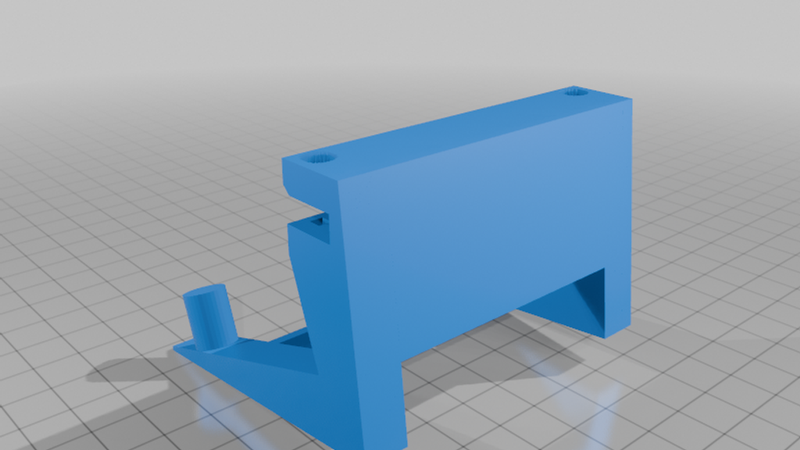
Description
Rocket Espresso R58 PID Holder — Reinforced Twin-Clip Mount
A one-piece printed bracket that clips onto the R58's rectangular rail and holds the PID control box on two nipples, leaning back at the machine's original display angle.
This is a redesign of the common single-clip holder, which creeps and loses grip over time. This version puts steel in the load path instead of relying on flexing plastic — a horizontal M3 bolt locks the clip shut behind the rail, so the holder can't walk off or loosen from vibration and heat cycles.
Fits
- Rail: rectangular, 5mm wide x 7mm deep. The clip hooks on from above with no force and no flexing — the bolts clamp out the remaining play.
- PID box: 132 x 80 x 26mm with two mounting holes 65mm apart. Matches the Rocket R58/R60V display, part # RA199905727 ("Milano" display).
- Overall size: 74.3 x 68 x 56.6mm (W x H x D)
- Designed to mount on the machine's back rail, set back far enough that it doesn't interfere with the water tank opening or its LED
Hardware (per unit)
- 2x M3 x 12 socket head cap screw (don't go longer — 12mm is the correct length, and it sits flush)
- 2x M3 hex nut
Screws can be re-tightened any time, e.g. after heat cycles — no threads are cut into the plastic.
Assembly
1. Hook the holder onto the rail from above.
2. Drop one nut into each slot behind the mouth — it self-seats and can't rotate.
3. Insert the two M3x12 screws from the front and tighten (snug, don't overtighten — you're clamping into plastic). This locks the clip shut behind the rail so it can't come off or loosen.
4. Hang the PID on the two mounting nipples.
To remove: back the screws out and lift off.
Print settings
- Orientation: on its side, with supports. Printing flat on its bottom will work without supports, but the layer lines end up too thin in the direction that matters structurally.
- Material: PETG recommended
- Walls: 4+ perimeters, ~25% infill
Tolerances are baked into the model, so it should bolt together as-is. If your printer runs a little tight, the nut slots are the first place you'll feel it — a light push seats the nut.