ESP32 Daily Bible Verse Digital Frame: A Complete Build Guide

Description
We built a digital picture frame that pulls a new Bible verse every day. No SD cards. No manual updates. Just WiFi and an ESP32.
Here's exactly how we did it, why we chose each component, and what we'd do differently next time.
What This Project Does
The frame connects to WiFi, fetches a verse from an API, and displays it on an e-paper screen. It updates once daily to save power. The whole thing runs for months on a single charge.
Step 1: Choose Your Hardware
ESP32-WROOM-32 – We used this over an Arduino Uno because it has built-in WiFi. No extra modules needed. The ESP32 also gives us deep sleep modes that draw only 10µA.
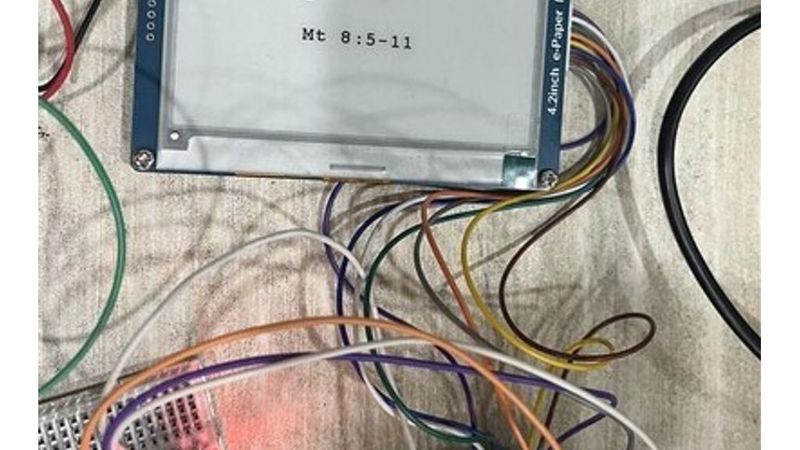
7.5 inch e-paper display (800×480) – Waveshare makes a solid one. We picked tri-color (black, white, red) so the verse reference stands out. E-paper uses zero power to hold an image – perfect for a frame that updates once daily.
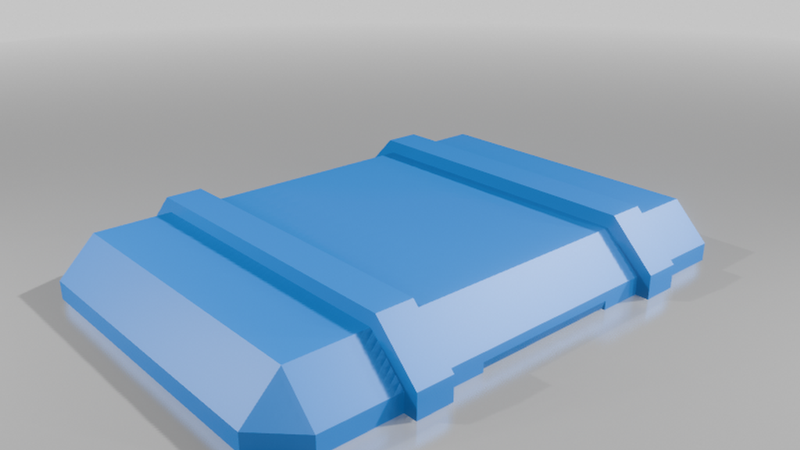
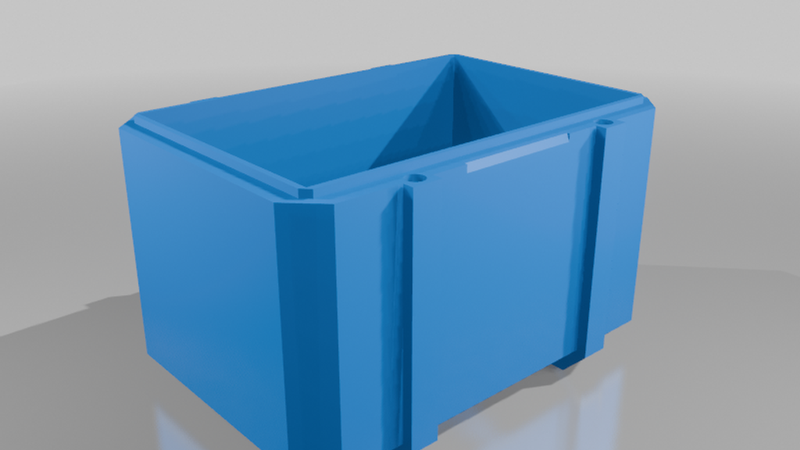
3D printed frame – We designed ours in Fusion 360. The back has a slot for a 18650 battery holder. The front bezel hides the PCB.
Battery – Single 18650 cell (3400mAh). With daily updates taking about 30 seconds of WiFi, the ESP32 stays in deep sleep the other 23 hours and 59 minutes. Math works out to roughly 4 months runtime.
Step 2: Circuit Assembly
We kept it simple. No voltage regulators needed – the Waveshare board runs at 3.3V.
Connections:
- ESP32 GPIO 4 → e-paper BUSY
- GPIO 5 → RST
- GPIO 15 → DC
- GPIO 18 → CS
- GPIO 19 → CLK
- GPIO 23 → DIN
- 3.3V → VCC
- GND → GND
That's it. Six signal wires, power, ground.
Step 3: Firmware – The Core Loop
We wrote this in Arduino IDE with ESP32 board support. Here's the logic:
```
1. Wake from deep sleep
2. Connect to WiFi (timeout after 10 seconds)
3. GET request to bible-api.com
4. Parse JSON response
5. Render text to e-paper buffer
6. Update display
7. Disconnect WiFi
8. Enter deep sleep for 86400 seconds (24 hours)
```
The JSON parser is ArduinoJson v6. We allocate a 1024-byte buffer – enough for a verse plus metadata.
Step 4: The Display Code
E-paper is slow. A full refresh takes 12 seconds. We use partial refresh for the verse text only, which cuts it to 3 seconds.
Font rendering was the tricky part. The 7.5 inch screen at 800×480 needs proper character spacing. We used Adafruit GFX library with a custom font file for the verse text at 24pt. The reference (book, chapter, verse) renders at 18pt in red.
```cpp
// Partial update for text only
epd.DisplayPartFrame(x, y, width, height);
epd.SetPartialWindow(buffer, x, y, width, height);
```
Step 5: Power Management
The ESP32 deep sleep is where this project shines. We measured:
- Deep sleep: 8µA
- WiFi connect + fetch: 180mA for ~8 seconds
- Display update: 150mA for 3 seconds
- Total per day: roughly 0.003 Ah
With a 3400mAh battery, that's over 1000 days theoretically. Real-world with battery self-discharge: about 3-4 months.
Step 6: 3D Design for the Frame
We exported the STL and printed on a Prusa MK4. The frame has three parts:
Back plate – Holds the battery, ESP32, and display driver board. Has ventilation slots.
Middle spacer – Creates 12mm gap between back plate and screen. This is where the wiring lives.
Front bezel – Snaps over the spacer. We left a 2mm border around the active display area.
Total print time: 6 hours at 0.2mm layer height.
Advantages Over Commercial Digital Frames
Zero subscriptions – Most smart frames charge $3-5/month for content. Ours costs $0 after build.
No cloud dependency – We can change the API endpoint anytime. If bible-api.com goes down, we switch to a local server.
Battery life – Commercial frames need wall power. Ours hangs anywhere.
Full control – Want to show a different verse translation? Change one line of code. Add a second API for weather? 20 lines.
Privacy – No company harvesting your viewing habits. The ESP32 fetches data and forgets.
What We'd Change for Production
If we built 100 of these, we'd:
- Use an nRF52840 instead of ESP32. The nRF52 has lower deep sleep current (1µA vs 8µA) and native Bluetooth if we wanted phone control. We'd lose WiFi though, so trade-off.
- Switch to Zephyr RTOS for better power management. The Arduino framework is fine for prototypes but Zephyr gives granular control over peripheral power states.
- Add a physical button for manual refresh. Right now, if someone wants to see a new verse before midnight, they have to power cycle.
- Use a custom PCB instead of breadboard. The prototype has jumper wires that look messy inside the frame.
Challenges We Hit
Font rendering – The default Adafruit fonts looked terrible at 800×480. We had to generate a custom bitmap font using a Python script that converted TrueType to the GFX format.
WiFi reconnection – The ESP32 sometimes hung on reconnect after deep sleep. The fix was adding a hardware reset pin to the e-paper driver. If WiFi fails after 3 attempts, we reset the whole system.
Ghosting – E-paper leaves faint traces of previous text. We added a full refresh every 7th update to clear it.
Cost Breakdown
| Component | Cost |
|-----------|------|
| ESP32-WROOM-32 | $4 |
| 7.5" e-paper | $35 |
| 18650 battery | $6 |
| 3D print filament | $2 |
| Wires, headers | $1 |
| Total | $48 |
Compare to a commercial 7-inch digital frame at $80-120, plus subscription fees.
Source Code
We put the full code on GitHub. Key files:
- `frame.ino` – Main loop
- `verse_parser.cpp` – JSON handling
- `display_render.cpp` – E-paper drawing
- `font_24pt.h` – Custom font array
The repo also has the Fusion 360 CAD files and STL exports.
Summary
This project took our team about 20 hours total. The hardest part was font rendering. The easiest was the electrical – it's literally 6 wires.
If you want to build one, start with the ESP32 dev board and a smaller e-paper. Test the API calls first, then add the display. Get the power math right before designing the enclosure.
For anyone looking to take this further – adding Bluetooth config via a phone app, supporting multiple translations, or building a vending machine developement that dispenses these frames pre-programmed – the architecture is solid. We designed it to scale.
If you need an Arduino coder for hire who understands real hardware constraints (power budgets, WiFi reliability, display timing), reach out. We've done this dance before.