Raspberry Pi Pico MP3 Music Box
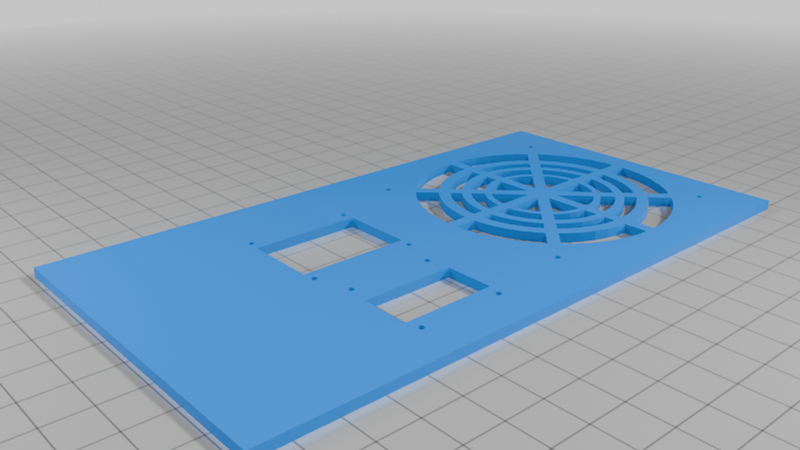
Description
I have a son who has recently gotten into Dungeons & Dragons. In his games, he likes to use background music for ambiance -- the chaotic murmur of a tavern when his players are chilling out waiting for the next mission, exciting battle music when things get dicey, and so on. The problem, to date, is that this music tends to come from some streaming platform on his iPad, which he says requires him to sift through at least two or three menus every time he wants to changes the music. Instead, why not have a few simple push buttons to start songs in different genres, with the usual music player buttons like play/pause, next/previous, volume +/-, etc? So, that's what I set out to do.
This uses a generic DFPlayer module. I'm late to the game when it comes to the DFPlayer. This module has been out for years, and I only just learned about it. I wish I had learned about it a long time ago. Actually, I have had one sitting in my parts box for about a year, purchased on a whim from the wall at at a local electronics store (iffybooks.net), thinking that some day I'd pick it up and take a look. Well, I finally did, and what a nice little piece of technology! It brings together a bunch of different functions into a super cheap and easy-to-work with module: SD card reading, MP3 decoding, and audio output.
I'm not doing anything fancy or unexpected with it, but I found it hard to find easy-to-follow instructions for non-technical folks online. I was able to wade through things and pull out key functionality enough to do what I wanted. But for others out there, who don't want to wade through electronic schematics or technical descriptions, here is a simple set of instructions for using this thing.
What You Need
A full list of components are the following. Everything is dirt cheap. Full cost is $20 or less:
- Rasberry Pi Pico (any version). This also works, with minor changes, with just about any board that accepts CircuitPython firmware.
- 0.96" OLED display
- DFPlayer module (mine is generic)
- 4AA battery pack with female jumper wire terminal
- speaker (I got this from salvaged trash). A headphone jack is also possible, but I don't cover that here
- SD card
- jumper wires
- a switch (I love the panel-mounted type I used, but any switch would be fine)
- buttons (I used a 4x2 keypad, which gives you 8 buttons on a single module and makes wiring easier, but 8 individual buttons would work just as well)
- (optional) perfboard, header, wire, solder, and soldering iron for permanence. I used an Adafruit PermaProto board, but there are lots of cheaper options. I just happen to like these and have extras
Wiring It Up
The wiring is fairly straightforward.
Start (as always) by providing common ground and power using the side rails on your breadboard or perfboard. This project will need both 5v and 3.3v, so make a rail for each (and make sure you connect things to the right voltage).
The display is an I2C device, which means it just needs 4 pins. These go to the 3.3v, GND, and the two I2C pins (I used 32 (GP27) and 31 (GP26). No need to break out the I2C pins on the breadboard -- we only have one of these devices in this project.
The DFplayer module communicates via UART. The board connects to the TX and RX pins on the ESP32 has these on 21 and 22 (GP16, 17). The RX pin on the Pico should connect to the TX pin on the DFPlayer and vice versa. My cheap DFPlayer has these mislabeled, so if things don't work as expected when you're done, try switching these. The module also needs to connect to power and ground. Finally, you need to wire up either a speaker or a headphone jack. Speakers are easiest. The two speaker wires connect to the last and third-to-last pins on the left-hand side of the DFPlayer. It doesn't matter which wire goes to which pin.
Next, connect your buttons. In the code provided, it's easy to switch around which pins you want to do what, but mine are using pins 0-7. If you're using individual buttons, you just need to connect one of their legs to its own IO pin and the other leg to the common ground. If you are using the 4x2 keypad matrix, there are 9 pins -- one for each button and a common ground, so connect ground to ground, and connect each of the button pins to an IO pin.
Finally, you just need to connect your battery. Use a switch connected through a hole in the case so that you can turn power on and off without messing with battery wires. On the battery pack, connect the black wire to GND, and the red wire to one side of the switch. Next, connect the other side of the switch to the 5v pin on the ESP32. Note that 4AA batteries provide 6v with a full charge, which is more than our system wants. But the ESP32 is capable of handling a range of input voltages, so 6v should be fine (it was for me).
Software
This project us using CircuitPython, a fork of MicroPython maintained by Adafruit Industries. Before the code will work, you will need to flash the ESP32 with the CircuitPython firmware. If you don't know how to do this, see my zine #####
This code isn't pretty and could be shorter, but I kept it ugly and complicated so that it would be easy to understand. I should note that it takes advantage of the very useful DFPlayer library, maintained by ####. It also makes use of the excellent Adafruit libraries for the display and everything else. Those two libraries (DFPlayer and adafruit_ssd1306) both need to be copied to the esp32's library.
I recommend using Thonny to write your code and interface with the ESP32. See my zine #### for details on this. I also recommend saving the code below as a separate file on the ESP32 to make sure it runs well. Once you're sure, rename it to code.py, which will cause it to run as soon as the ESP32 boots up.
import board
import busio
import digitalio
import adafruit_ssd1306
from DFPlayer import DFPlayer
import time
Initialize UART (for mp3 module)
uart = busio.UART(tx=board.TX, rx=board.RX, baudrate=9600, timeout=0.1)
i2c = busio.I2C(board.SCL, board.SDA)
oled = adafruit_ssd1306.SSD1306_I2C(128, 64, i2c, addr=0x3c)
button1 = digitalio.DigitalInOut(board.IO0)
button1.direction = digitalio.Direction.INPUT
button1.pull = digitalio.Pull.UP
button2 = digitalio.DigitalInOut(board.IO1)
button2.direction = digitalio.Direction.INPUT
button2.pull = digitalio.Pull.UP
button3 = digitalio.DigitalInOut(board.IO2)
button3.direction = digitalio.Direction.INPUT
button3.pull = digitalio.Pull.UP
button4 = digitalio.DigitalInOut(board.IO3)
button4.direction = digitalio.Direction.INPUT
button4.pull = digitalio.Pull.UP
button5 = digitalio.DigitalInOut(board.IO4)
button5.direction = digitalio.Direction.INPUT
button5.pull = digitalio.Pull.UP
button6 = digitalio.DigitalInOut(board.IO7)
button6.direction = digitalio.Direction.INPUT
button6.pull = digitalio.Pull.UP
button7 = digitalio.DigitalInOut(board.IO6)
button7.direction = digitalio.Direction.INPUT
button7.pull = digitalio.Pull.UP
button8 = digitalio.DigitalInOut(board.IO5)
button8.direction = digitalio.Direction.INPUT
button8.pull = digitalio.Pull.UP
button_play = button7
button_previous = button5
button_next = button3
button_volup = button1
button_folder1 = button8
button_folder2 = button6
button_folder3 = button4
button_voldown = button2
Initialize DFPlayer
df = DFPlayer(uart, volume=15)
status = df.query_status()
volume = 15
pause_play = "none"
def hex_string(data):
if not data:
return "None"
return ' '.join(['%02X' % b for b in data])
Play the first track
while True:
if not button_play.value:
if pause_play == "none":
print("playing track")
df.play()
pause_play = "Playing"
time.sleep(.5)
elif pause_play == "Playing":
print("paused")
df.pause()
pause_play = "Paused"
time.sleep(.5)
else:
df.play()
print("unpaused")
pause_play = "Playing"
time.sleep(.5)
if not button_next.value:
df.next
print("next track")
if not button_voldown.value:
df.volume_down()
res = df.query_volume()
if res:
print(f"Volume is: {res[6]}")
else:
print("No response for volume query")
time.sleep(.2)
if not button_volup.value:
df.volume_up()
res = df.query_volume()
if res:
print(f"Volume is: {res[6]}")
else:
print("No response for volume query")
time.sleep(.2)
if not button_previous.value:
df.previous()
print(df.query_track_count())
time.sleep(.5)
if not button_next.value:
df.next()
print(status)
time.sleep(.5)
if not button_folder1.value:
df.play_folder(1, 1)
print("effects folder")
time.sleep(.5)
if not button_folder2.value:
df.play_folder(2, 1)
print("effects folder")
time.sleep(.5)
if not button_folder3.value:
df.play_folder(3, 1)
print("effects folder")
time.sleep(.5)
res = df.query_volume()
oled.fill(0)
Without 'try', this throws and error that the screen can't interpret and kills the program
try:
oled.text(f"Volume is: {res[6]}", 0, 1, 1)
except:
oled.text(f"Waiting", 0, 1, 1)
oled.text(pause_play, 0, 10, 1)
oled.show()