
Lenovo T14 Underdesk Mounting Bracket with Charging Port Opening

Description
Lenovo T14 Under-Desk Laptop Mount:
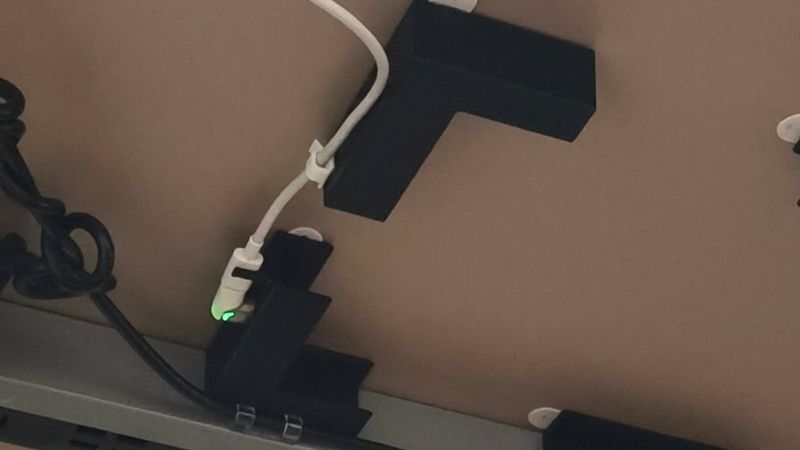
This under-desk mounting solution is designed specifically for the Lenovo T14 laptop. It securely holds the device beneath a desk or similar surface while maintaining convenient access to charging and ports (One of the 2 type C ports is blocked but the model can be edited to add an opening).
The design includes an integrated opening for a charging connection, compatible with a 90-degree magnetic charging adapter (third-party accessory).
Features!
L-Shaped Brackets (2x):
Provide primary corner support for the laptop.
One bracket includes a dedicated charging port opening and integrated cable retention clip for use with a magnetic 90-degree adapter.
U-Shaped Brackets (2x):
Secure the sides of the laptop to prevent lateral movement.
Cable Management:
Built-in clip to help route and secure the charging cable
Installation.
Prepare Mounting Surface:
Clean the underside of the desk (or intended mounting surface) & mounting brackets to ensure proper adhesion with degreaser/isopropyl alcohol.
Apply Adhesive Strips:
Attach 3M adhesive mounting strips (damage-free or permanent) to the mounting plates.
Ensure full coverage for maximum holding strength.
Position Brackets (Dry Fit):
Arrange the L-shaped and U-shaped brackets according to the laptop’s dimensions.
Use the laptop as a reference to confirm proper alignment and spacing before final installation.
Mount Brackets:
Firmly press each bracket into the mounting surface to secure the adhesive bond.
Install Laptop:
Carefully slide the laptop into the mounted brackets.
Ensure it is fully seated and properly supported on all sides.
Notes:
While designed for under-desk installation, the mount can be applied to any suitable flat surface.
Allow adhesive to cure per manufacturer recommendations before extended use.
Verify adhesive weight ratings to ensure compatibility with the laptop’s weight.